
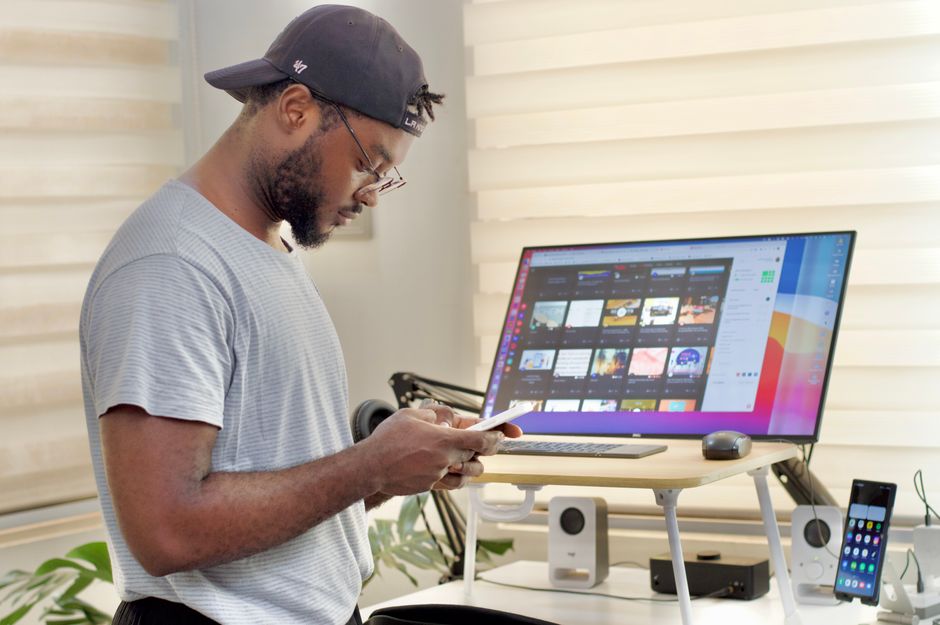
What is “tech neck”?
“Tech neck” is a common term for neck, shoulder, and upper-back discomfort linked to prolonged screen use. It often develops when the head stays bent forward while looking at a phone, tablet, laptop, or poorly positioned monitor.
The problem is not a single posture or a specific device. Neck strain usually builds from a combination of sustained positioning, repetitive movements, limited breaks, muscle fatigue, and an uncomfortable workstation. A person may notice aching, stiffness, headaches near the base of the skull, shoulder tightness, or reduced neck mobility.
In Utica, NY, screen-heavy routines may become especially noticeable during long indoor periods in winter, when cold temperatures, snow, and shorter daylight hours encourage more time at desks, on couches, or using handheld devices.
Why does looking down cause discomfort?
The head is naturally balanced over the spine when the ears are roughly aligned with the shoulders. As the head moves forward and downward, the muscles in the neck and upper back must work harder to support it.
Holding that position for a few minutes may not cause a problem. Holding it repeatedly for hours can lead to muscle fatigue and irritation. The same effect can occur while reading in bed, scrolling on a phone, working from a laptop at a kitchen table, or watching a screen placed too low.
A common misconception is that “perfect posture” must be maintained all day. In reality, the body generally tolerates a variety of positions better than it tolerates staying in one position for too long. Frequent, comfortable movement is often more useful than trying to sit rigidly upright.
How should a workstation be arranged?
A computer setup should allow the head and neck to remain balanced without leaning forward. Small adjustments can make a meaningful difference.
- Place the main monitor directly in front of the body rather than off to one side.
- Set the top of the screen at or slightly below eye level.
- Keep the screen far enough away to read without leaning toward it, usually about an arm’s length.
- Position the keyboard and mouse so the elbows remain close to the body and the shoulders stay relaxed.
- Support the lower back and keep both feet supported by the floor or a footrest.
- Increase text size instead of moving the head closer to the screen.
- Reduce glare from windows and overhead lighting so squinting does not lead to forward head movement.
Laptops create a particular challenge because the screen and keyboard are attached. Raising the laptop screen can improve neck position, but the keyboard may then become too high. For longer work sessions, a separate keyboard and pointing device can allow the screen and hands to be positioned independently.
A dining chair, couch, or kitchen counter may work temporarily, but these surfaces are often poorly matched to screen-based work. If a household uses one area for both meals and computer tasks, even a simple change—such as adding back support or raising the screen—can reduce strain.
What is the safest way to use a phone?
The goal is to bring the device closer to eye level instead of repeatedly bringing the head down toward the device. This does not require holding the phone high for long periods if that causes shoulder fatigue. The better approach is to change positions regularly.
Useful habits include:
- Hold the phone with both hands for longer typing tasks.
- Rest the elbows on a stable surface when reading.
- Use voice-to-text for lengthy messages when appropriate.
- Alternate hands instead of using the same thumb continuously.
- Lift the phone toward the face rather than bending the neck sharply.
- Avoid prolonged phone use while lying on the stomach or propping the head forward.
- Take a movement break before discomfort becomes intense.
For reading, place the phone or tablet on a stand when possible. A stand can be especially helpful for recipes, video calls, online classes, and long articles.
How often should someone take a screen break?
A practical approach is to change position or move briefly every 20 to 30 minutes. The break does not need to be long. Standing, walking across the room, rolling the shoulders, or looking away from the screen can interrupt sustained loading.
Longer work sessions should include periodic movement rather than relying on one large break at the end of the day. A timer, calendar reminder, or natural transition—such as standing whenever a meeting ends—can make the habit easier to maintain.
During indoor winter routines, movement may need to be planned more deliberately. Walking through the home, using stairs safely, completing light household tasks, or taking a short outdoor walk when conditions permit can help prevent hours of uninterrupted sitting.
Which exercises may help prevent tech neck?
Exercises should be gentle and should not reproduce sharp, radiating, or worsening pain. A simple routine may include:
- Chin retractions: Sit tall and glide the head straight backward, as if making a small double chin. Do not tilt the head up or down.
- Shoulder blade movements: Gently draw the shoulder blades slightly back and down, then relax.
- Neck rotation: Turn the head slowly from side to side within a comfortable range.
- Chest stretching: Place the forearms on a doorway and gently shift forward without forcing the shoulders.
- Upper-back movement: Sit or stand tall and periodically extend the upper back rather than remaining rounded.
These movements are intended to restore variety and mobility, not to force the neck into a particular position. If symptoms increase during or after an exercise, stop that movement.
Is tech neck caused only by bad posture?
No. Posture is only one factor. Neck symptoms may also be influenced by sleep position, stress, insufficient physical activity, vision problems, muscle weakness, prior injuries, arthritis, and the total amount of time spent using screens.
A person can develop discomfort even with an apparently good workstation if work continues for several uninterrupted hours. Conversely, an imperfect posture may be tolerated better when it is brief and regularly interrupted.
This is why changing the environment, reducing continuous screen time, improving general movement, and responding early to symptoms are all useful parts of prevention.
When should neck pain be evaluated?
Mild stiffness that improves with movement and rest is often manageable with simple adjustments. Persistent or recurring symptoms deserve more attention, particularly if they interfere with sleep, work, driving, exercise, or normal neck movement.
Prompt medical evaluation is appropriate when neck pain follows a significant fall, collision, or other injury. Urgent attention is also needed for neck pain accompanied by arm or leg weakness, numbness or tingling, loss of coordination, severe headache, fever, fainting, or difficulty walking.
A chiropractor, physical therapist, or medical clinician may assess movement, muscle function, workstation habits, and other possible contributors. The right choice depends on the symptoms and their severity. Self-care should not delay evaluation of neurological symptoms or serious injury.
A simple daily check
At the beginning of a screen session, ask:
- Is the main screen directly in front of me?
- Can I read it without leaning forward?
- Are my shoulders relaxed?
- Are my feet supported?
- Have I changed position recently?
- Am I using a phone at a low angle for an extended period?
If the answer to several questions is no, adjust the setup before discomfort becomes the routine. Preventing tech neck is less about holding one perfect pose and more about creating a work-and-device environment that supports regular movement, comfortable alignment, and reasonable limits on uninterrupted screen use.